How to Choose Virtual Staging in NYC for a Vacant Listing
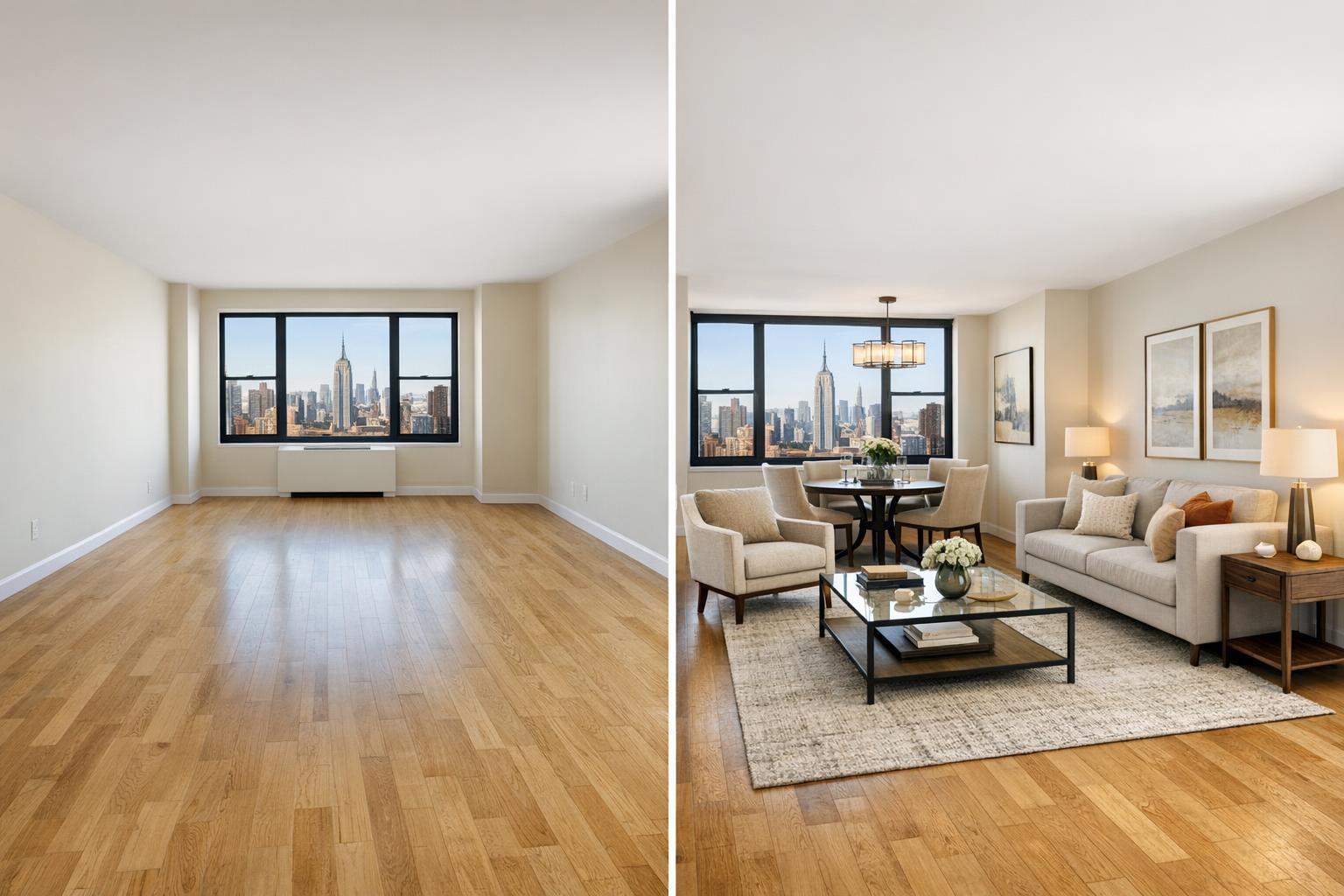
A room with a stunning NYC skyline view is transformed through virtual staging to include elegant furniture and decor.

How to Choose Virtual Staging in NYC for Vacant Listings
Virtual staging in NYC has become an essential tool for helping real estate professionals present vacant listings in their best light. When a property is empty, even high-quality photos can leave buyers puzzled about room function, furniture placement, or the scale of a space. Effective digital furniture staging makes a room feel approachable and understandable—all without altering the property itself.
In a city like New York, where floor plans can be quirky and square footage is precious, strategically staged images make a big impact. From compact Manhattan studios with multipurpose alcoves to spacious, feature-filled Brooklyn brownstones, virtual staging helps buyers “see” what’s possible. But not every empty room needs digital furniture, and not every staging service delivers equally realistic results. Here’s how to navigate your options and make confident decisions for your next vacant listing.
When (and Why) Virtual Staging Makes Sense
Virtual staging is most valuable in rooms where the function, flow, or proportions aren’t immediately obvious. Before ordering, take a moment to review your current listing photos with a buyer’s perspective in mind:
- Is the intended use of each space clear?
- Would adding furniture help illustrate a logical layout?
- Are there ambiguous areas—like a windowed alcove, flex room, or oddly shaped living space—where most buyers would struggle to envision their own furniture?
Consider digital staging for:
- Empty living rooms with no obvious focal point
- Combined kitchen-dining areas where zone separation is unclear
- Bonus rooms or alcoves with multiple potential uses
- New construction units that feel impersonal or abstract when unfurnished
- Garden or parlor levels in older homes where layout is nontraditional
You don’t need to stage every photo. A handful of thoughtfully chosen, digitally staged images are usually more persuasive—and more honest—than filling every shot with computer-generated decor. It’s also wise to keep some images unstaged, especially when showing off views, distinctive details, or finishes.
What Virtual Staging Can (and Can’t) Do
Digital staging places realistic furniture and decor overlays within your photos, giving buyers a sense of how each room could look furnished. While this can make a listing much more accessible, there are clear boundaries:
Virtual staging can:
- Show reasonable placements for beds, sofas, tables, or desks
- Demonstrate how open-plan rooms can be divided into zones
- Highlight circulation paths and relationships between windows, doors, and furniture
- Suggest a home office nook, dining setup, or second bedroom layout
It should not:
- Move walls, expand windows, or create features that don’t exist
- Hide permanent conditions or structural quirks
- Add elements that suggest extensive renovations
- Cram oversized, impractical, or ultra-trendy furnishings that do not fit the property’s character
In a small Upper East Side apartment, that might mean illustrating how a compact loveseat and dining table fit comfortably. In a historic Brooklyn brownstone, the staged furniture should complement original architectural details instead of clashing with them. For new developments, a minimalist approach that highlights views and finishes is usually best.
Deciding Which Photos to Stage
Not every photo needs digital staging; focus on images that answer buyers’ most immediate questions.
- Prioritize rooms buyers might find confusing when empty: long, narrow living rooms, flex spaces, secondary bedrooms, or lower-level rec rooms.
- Emphasize believable arrangements: Staged furniture should honor the room’s flow, scale, and fixed elements. For example, a queen bed should not be wedged into a tiny room just to prove a point.
- Let architecture shine: When a gorgeous view or original fireplace is already the highlight, consider keeping that photo unstaged.
- Use restraint: A mix of staged and unstaged photos helps buyers trust that your listing is an honest reflection of the property.
Style: Matching Staging to Property and Buyer
The best virtual staging feels natural—like a plausible, comfortable version of real life. It should echo the property’s character while appealing to the likely buyer pool. For example:
Prewar apartments or brownstones:
Classic or transitional furnishings work well with original millwork, fireplaces, or high ceilings. It’s fine to introduce some contemporary elements, but they should never clash with the home’s underlying character.
New developments and modern condos:
Opt for clean-lined, modern staging that complements sleek kitchens, big windows, and open layouts. Avoid clutter or bulky furniture that could compete with architectural finishes.
Smaller apartments:
Scale is everything. Choose furniture that fits comfortably—think a tidy sofa, petite dining table, or simple office setup. Overcrowding the image makes spaces feel smaller.
Ultimately, your staging provider should adapt their approach to suit the property, the location, and the likely expectations of buyers in that segment of NYC.
Preparing for Digital Staging: Clean Slate Only
Virtual staging shines in clean, empty rooms. If there’s any leftover furniture, boxes, or clutter in the photos, you’ll need to address that before the staging process begins. Simply layering virtual models over existing items leads to unrealistic results. With RealtaSnap, digital furniture staging is only applied to completely vacant or properly decluttered rooms. If a space needs a digital cleanup, that step should be completed before staging overlays are added.
For best results:
- Remove all items from rooms to be staged before photography
- If that’s not possible, arrange for image-based clutter removal as a first step
- Turn on lights and open blinds to give the room a bright, inviting appearance
Choosing a Virtual Staging Service in NYC: What Matters
There are many virtual staging services in NYC, but not all are equally attentive to the details that matter for honest, useful listing photography. When evaluating providers:
- Ask if they can work with professional, perspective-corrected listing photos
- Review their sample work for style flexibility, accurate scaling, and realistic shadowing
- Confirm that only the rooms needing context will be staged
- Clarify how they handle rooms where existing furniture is present
- Make sure the design leaves windows, doors, radiators, and other features unobstructed
- Ask about the revision process in case a staged layout feels impractical
- Confirm how staged images will be disclosed, especially if your MLS or brokerage requires it
A compelling portfolio is helpful, but look for evidence that staged scenes respect architecture, proportion, and honest presentation—not just “pretty” virtual rooms.
Disclosing Virtual Staging: Transparency Builds Trust
Digital staging is a visualization tool, not an architectural promise or a record of current condition. Buyers should understand that staged images are conceptual. Most NYC listing platforms and brokerages expect clear labeling—often as simple as a “Virtually staged” callout, either on the image or in the caption. Check your platform’s requirements and err on the side of transparency, especially when showing rooms set up for flexible or nonpermanent uses (like an office or guest bedroom).
Bringing Virtual Staging and Photography Together
Virtual staging is most effective when planned alongside listing photography—not as a last-minute add-on. Clean, professionally composed photos lay the foundation; thoughtful digital staging adds context where needed. Sometimes, pairing a staged photo with an accurate floor plan helps buyers visualize both layout and possible use, especially in unique NYC properties.
At RealtaSnap, digital furniture staging is offered for vacant rooms only, ensuring a realistic and honest presentation. Professional real estate photography and virtual staging can be scheduled together to create visually cohesive listings that appeal to both buyers and brokers. For more details about real estate media options, visit RealtaSnap’s main website.
If you’re weighing whether virtual staging is a good fit for your next listing, RealtaSnap is always glad to discuss local best practices and service options.
FAQ
Question: How many rooms should I virtually stage in an NYC listing?
Answer: Focus on key spaces where furniture clarifies layout, such as living rooms, dining areas, or flexible bonus rooms. Rooms with strong architectural details or clear views can remain unstaged.
Question: Can digital staging be applied if there’s still furniture in the room?
Answer: For best results, virtual staging should only be added to vacant or fully decluttered spaces. If existing furniture is present, it must be removed or digitally cleared before staging overlays are added.
Question: Do virtually staged images need to be disclosed?
Answer: Yes, disclosure is important. Labeling images as “virtually staged” helps buyers understand they’re viewing a visual concept, not the room’s current physical arrangement. Check your listing platform and brokerage for specific labeling rules.
If you’re ready to elevate your NYC listing with professional photography and digital staging, RealtaSnap would be happy to help. Learn more or book online at www.RealtaSnap.com