Why Every NYC Listing Needs Virtual Staging: Benefits for Sellers and Agents
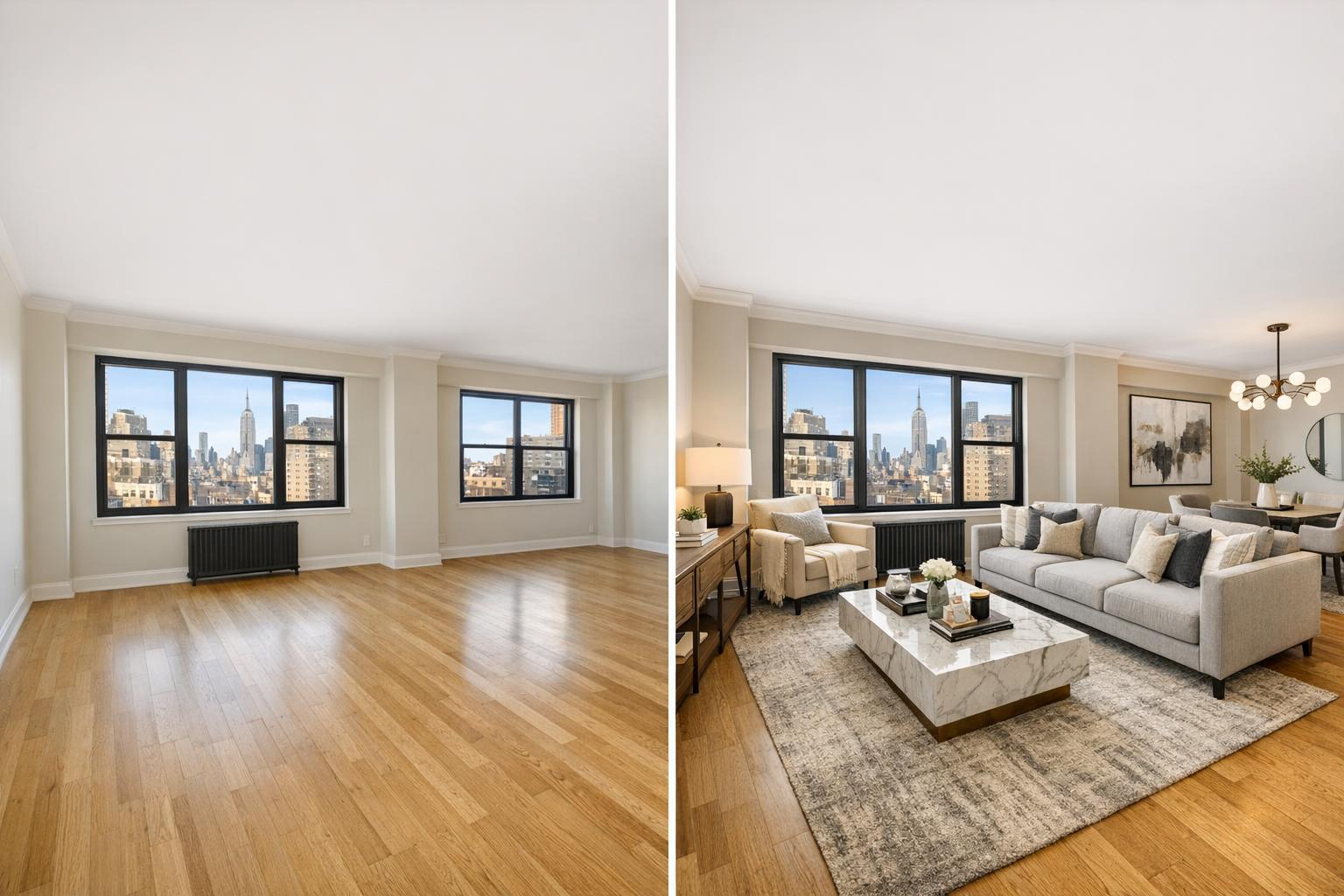
A side-by-side comparison showcases an empty apartment room and the same room enhanced through virtual staging NYC, featuring elegant furniture and decor.

Why Every NYC Listing Needs Virtual Staging: Benefits for Sellers and Agents
Virtual staging in NYC is quickly becoming an essential tool for agents and sellers trying to stand out in a crowded real estate market. In a city where floor plans are quirky, living spaces are compact, and the listing cycle moves fast, being able to show a property’s full potential online is more important than ever. Empty rooms can leave buyers scratching their heads. Well-executed digital staging helps them immediately picture how a space might look and function—an edge that consistently leads to stronger engagement.
The Real Value of Virtual Staging for NYC Listings
Walk through any vacant New York apartment or townhouse and you’ll see why online photos sometimes fall flat. Without furniture for scale, buyers struggle to judge proportions. Is there room for a dining area? Does that second bedroom work as an office or nursery? Digital staging adds context by visually furnishing the space, giving every room a clear “job.” Suddenly, the geometry clicks: alcoves show as dining nooks, spare rooms double as home offices, and wide-open lofts feel inviting, not empty.
Concerns like these are especially common in NYC properties such as:
- Studios juggling sleep, work, and living in tight quarters
- Classic railroad apartments with tricky, linear layouts
- Lofts needing clear zones for living and dining
- Prewar co-ops that feel imposing without modern context
- New developments where high-end finishes seem unfinished when bare
Rather than asking buyers to squint and imagine, staged photos show exactly what fits—making it far easier to see the possibilities.
Why Digital Staging Works So Well in the NYC Market
Traditional staging with real furniture still has its place, but in New York City, logistics can make it tough. Elevator bookings, co-op building rules, and tight move-in windows all take time and money—not to mention whole-apartment furniture rentals that aren’t always necessary. Virtual staging, by contrast, fits right in with how the real estate market works here:
- It’s fast. No waiting for sofas to get delivered or set up.
- It’s focused. Only digitally stage the rooms that really need a sense of purpose.
- It’s flexible. Sellers who’ve already moved out, estate sales, or new developments can launch listings with full galleries immediately after the property is photographed.
For NYC agents, that means a listing can go online with hero images in days, not weeks. When buyers see thoughtfully staged photos—like a dining nook laid out efficiently or a second bedroom as a sleek office—they get immediate clarity on how the property could suit their needs.
Smarter Marketing With Digital Staging
The true power of digital staging is how it helps both sellers and agents present listings with purpose, while also adapting to each property’s strengths:
- Cost-Effective: Instead of staging an entire home, focus your investment on just a few “hero” images that carry the story—like the living room, dining area, main bedroom, and any potential flex room.
- Tailored Presentation: Different buyers, different imaginations. One bedroom can be shown as a nursery or as a contemporary workspace, depending on what the audience is likely to value.
- Flexible for Unique Properties: From terraces in Brooklyn to compact Manhattan studios, digital staging brings out functional use without creating unrealistic expectations.
With RealtaSnap, adding AI virtual staging as a photo-by-photo add-on allows agents and sellers to choose which shots will benefit most from digital furniture—at $10 per photo, it’s a highly targeted way to increase visual impact.
Why Staged Images Get Noticed Online
An overwhelming majority of NYC home searches start on platforms like StreetEasy and Zillow. In a sea of thumbnails, well-furnished images grab attention and help buyers zero in on key selling points. Here’s how virtual staging boosts real estate media:
- Quicker Visual Processing: A staged living room lets buyers instantly “get” the size of the space, where the TV might go, and how furniture might be arranged—instead of seeing only an empty box.
- Stronger First Impressions: Highlighting key spaces like an inviting living room or a functional home office sets your listing apart from hundreds of vacant competitors.
- More Memorable Listings: Consistent, realistic furnishings tie the gallery together and help buyers better recall your property after browsing many others.
For agents, staged images aren’t just effective for the main listing—they’re also better suited for email campaigns, social media, and printed brochures.
Best Rooms to Virtually Stage for Maximum Impact
Not every single image in a listing needs digital furniture. Smart, selective staging keeps the gallery believable and highlights exactly what buyers want to know.
Prime staging candidates include:
- Living Room: Show scale, traffic flow, and conversation areas.
- Dining Nook or Open Kitchen: Prove that there’s room to entertain, even in tight spaces.
- Primary Bedroom: Make it easy to understand what bed size fits, and whether there’s enough storage.
- Flex Room or Second Bedroom: Demonstrate options—a guest room, office, or playroom.
- Outdoor Spaces: Show how a terrace or balcony could be set up for relaxing or entertaining.
Strategic digital staging answers the most common buyer questions while helping them see past a property’s vacant or cluttered state.
Realism Is the Key to Effective Virtual Staging
Not all virtual staging is created equal. Over-staging with oversized sectionals, wild color schemes, or blocking windows can turn off savvy NYC buyers. Here are some practical tips for credible staging:
- Match the style and size of furniture to the property and neighborhood.
- Leave windows, built-ins, and unique architectural features visible.
- Use digital staging to clarify, not conceal, the room’s actual structure or possible flaws.
- When in doubt, keep it simple. Less is often more in small NYC rooms.
And remember: RealtaSnap’s AI Virtual Staging works only on photos of vacant or properly decluttered spaces. If the room still has furniture, it should be removed prior to shooting, or clutter removal can be ordered as an additional edit.
Combining Staged Images With Complete Listing Media
A polished set of staged images is only part of the strategy. Serious buyers still want to see the full suite of media: kitchens, baths, storage, building amenities, views, and unaltered property features. Often, the best approach is to:
- Use professional real estate photography for all core features.
- Add virtual staging selectively, where it powers up the listing story.
- Supplement with a floor plan or video to help buyers grasp flow and dimensions.
- Consider a 3D tour for remote buyers or those needing a deeper look.
For tips on preparing your property for photography or digital staging, the RealtaSnap real estate photography prep guide is a great resource.
Preparing for Virtual Staging Success
If you’re considering virtual staging for your next NYC listing, a bit of prep goes a long way. Remove any remaining furniture from the rooms to be staged, tidy up, open the blinds, and make sure bulbs are working. The cleaner the photo, the more convincing the final staged image will look. Most importantly, book services that let you control which rooms are staged, so your marketing spend is focused on the spaces that make the strongest impact.
How to Get Started With RealtaSnap
Ordering digital staging with RealtaSnap is straightforward. Simply select AI Virtual Staging as an add-on to your photography package and choose the images you want staged. Pricing is transparent—$10 per photo added—and available throughout all five NYC boroughs and statewide in New Jersey. Appointments can be booked online, and the site shows real-time availability so you can secure your preferred time without any guesswork.
For more details or to schedule your shoot, visit www.RealtaSnap.com.
FAQ
Question: Can I use virtual staging if my property isn’t completely empty?
Answer: It’s possible, but the room should be fully decluttered prior to staging. RealtaSnap does not layer virtual furniture on top of existing pieces. If furniture remains, order a clutter removal edit or clear out the room before photography.
Question: How many photos should I have staged for a typical NYC listing?
Answer: Most listings benefit from focusing on primary spaces: the living area, dining space, main bedroom, and any extra rooms that might need a clear use. The exact number depends on the size and layout of the property.
Question: Does digital staging mean I can skip professional photography?
Answer: No. Virtual staging relies on high-quality listing photos as its foundation. For the best, most believable results, start with professional photography and then select key images for digital staging.
Curious how virtual staging can boost your specific NYC or New Jersey listing? Explore your options and view booking details at www.RealtaSnap.com.