Choosing Virtual Staging in NYC: What to Ask Before You Book
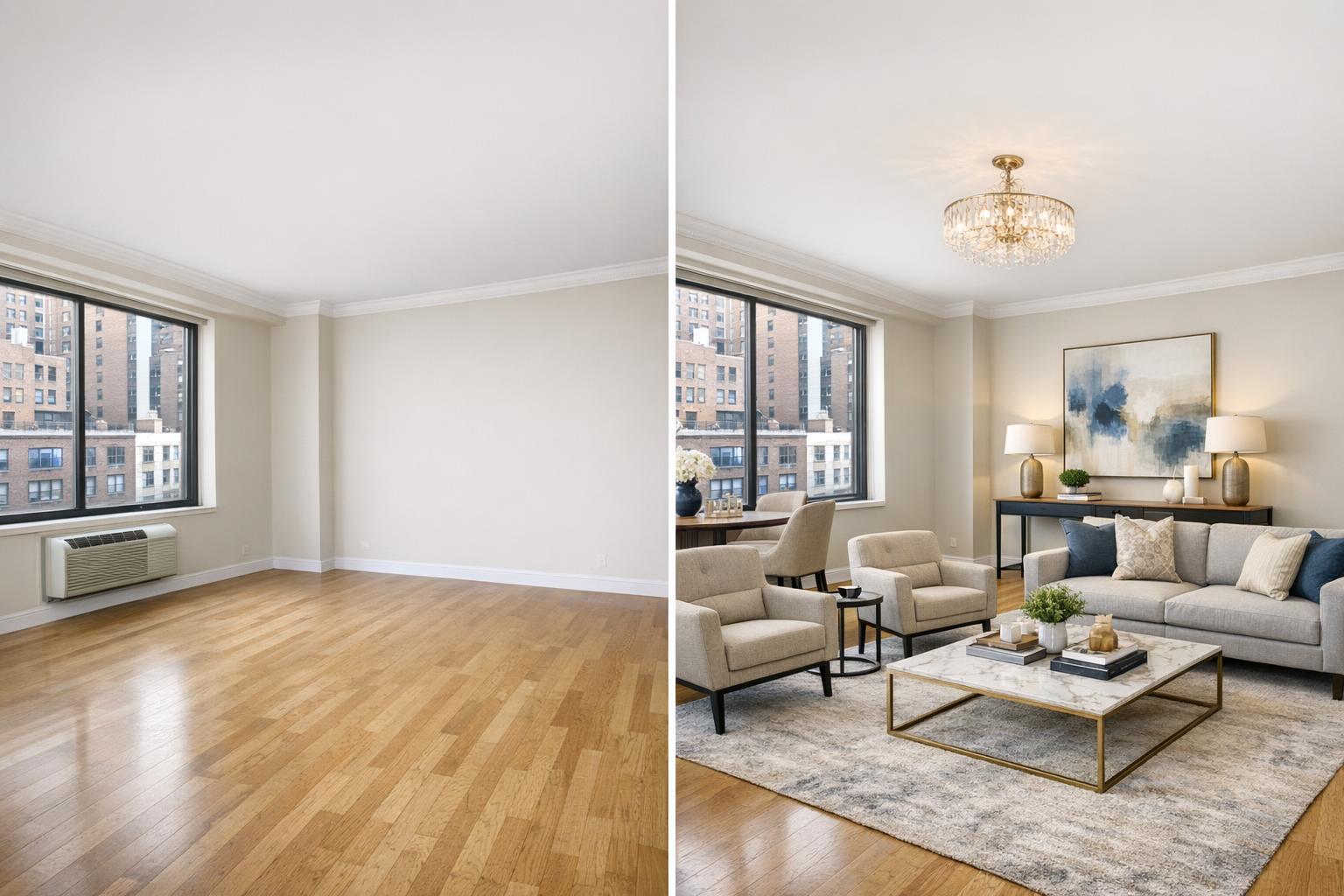
The image showcases a before-and-after transformation with virtual staging NYC, turning an empty room into a stylishly furnished living space.

Choosing Virtual Staging in NYC: What to Ask Before You Book
Virtual staging in NYC has quickly become a go-to tool for agents, brokers, and property owners aiming to help buyers or renters see the potential of an empty space. Whether you’re preparing a Manhattan apartment, a spacious Brooklyn brownstone, or an unfurnished rental between tenants, digitally staged images can transform a listing’s first impression. But the process comes with its own set of questions—especially in a market as diverse as New York City.
If you’re exploring virtual staging services in NYC, here’s how to tell if it’s right for your property, what preparation is needed, and which questions to ask before booking.
What Virtual Staging Actually Is (and Isn’t)
Virtual staging uses digital furniture and décor to show what an empty space could look like when lived in. Imagine a blank living room reimagined with a sofa, art, and a rug, or a spare second bedroom set up as a sleek home office—all achieved through software, not warehouse deliveries. Unlike a renovation or hypothetical architectural rendering, virtual staging does not invent new features. The real floor, windows, ceiling, and built-ins should remain honestly represented. The aim is to help viewers interpret the space, not mask limitations or imply structural changes.
This distinction is especially important in NYC, where apartments often come with unique layouts, quirky nooks, or flexible rooms. Instead of trying to transform a pre-war dining room into something it’s not, effective virtual staging highlights how the room can function—whether as a dining space, an office, or a den—while remaining true to its form.
When Is Virtual Staging Most Useful?
Virtual staging shines in three common NYC scenarios:
- Vacant listings: The property has been emptied and needs visual context for marketing.
- Lightly prepared or decluttered rooms: There may be a few items left behind, but the room is close to empty (or clutter can be digitally removed ahead of staging).
- Newly renovated spaces: When the work is done but the furniture isn’t in, virtual staging can show how finishes and layouts work for daily life.
Typical use cases in NYC include:
- A Manhattan condo with a blank main living area.
- A Brooklyn brownstone where furniture helps define the scale of large rooms.
- A co-op or rental between tenants, where staging gives personality to otherwise impersonal spaces.
- Any room that photographs as bright but feels tough to interpret—such as flex spaces, parlor floors, or wide studios.
A staged image gives viewers a reference point for how rooms work, but it’s not a magic fix for other issues. Cleaning, repairs, and proper prep still matter. If walls are scuffed, natural light is uneven, or boxes clutter the corner, those problems should be addressed before any digital staging is considered.
Does the Room Need to Be Empty?
For virtual staging services in NYC, the best results start with a clean, vacant room. RealtaSnap, for instance, designs its AI virtual staging for spaces that are either fully empty or have been properly decluttered. Furniture and large décor typically should not remain in the shot. If there are beds, sofas, or tables left over, those need to be physically removed in advance or handled with a clutter-removal edit—a separate service that comes before the virtual staging itself.
Why is this so important? Any real-world furniture that lingers in the photo can interfere with perspective, cast confusing shadows, or make digital furnishings look out of place. To avoid an awkward overlap, take a walkthrough and look for:
- Leftover chairs, rugs, or wall art
- Boxes, bins, cords, or cleaning gear
- Personal and pet items
- Excess decor on windowsills, shelves, or floors
- Spots where clear floor or wall space is needed for realistic placement
- Unique features—like a working fireplace, exposed brick, or skyline view—that should stay visible
If your listing isn’t quite ready but could be made so with a bit of clutter removal, set clear expectations at the outset and confirm if extra editing is needed.
Physical Staging, Virtual Staging, and Editing: What’s the Difference?
These terms sometimes get mixed together, but they each address a unique need:
- Physical staging: Professional movers bring in real furniture and arrange the property for showings and photographs. This works well for listings where in-person viewings are frequent and you want to set a “lived-in” tone. It involves more logistics, higher costs, and can run into access challenges in staffed buildings or brownstones.
- Virtual staging: Furniture and décor are digitally added to high-quality photos of the (empty) space. The real-world property remains unfurnished for visits, and only the photos show the upgrades. This is a fast, flexible way to add context, especially for vacant or between-tenant listings.
- Editing an already furnished room: If an image contains leftover furniture or clutter, the priority is often removing those objects before applying new virtual furnishings. This is a separate edit—replacing an entire furnished set-up is far more complex, and the results can be unpredictable if the underlying room isn’t first made bare.
What to Look for in Virtually Staged Images
Not all virtual staging is created equal. For a credible, appealing result:
- Scale matters: A massive sectional may look great in a Park Slope brownstone but will overwhelm a typical Upper West Side one-bedroom. The furniture needs to fit both the photo’s perspective and the room’s actual dimensions.
- Real features stay visible: Don’t let digital furnishings block slim windows, cover up built-in bookshelves, or obscure terrace doors. Prospective buyers want to see the radiator, the fireplace, and any millwork.
- Consistent light and style: Furnishings should look natural within the lighting and design of the room. If several rooms are staged, the design should feel coordinated, not a hodgepodge of catalog samples.
- Clear room function: Show realistic layouts and sensible uses for each space—don’t crowd a studio with three seating areas or stage a tiny nook as a banquet-sized dining room.
Choosing a Staging Style That Fits the Property
There’s no universal formula. A contemporary condo may call for fresh, minimalist staging; a renovated brownstone could benefit from rich textures or classic silhouettes; a rental studio might look best with streamlined, multi-purpose furnishings.
As you choose, consider:
- What story do you want the images to tell?
- Are you emphasizing modern upgrades or historic features?
- Which rooms most need definition?
- Is there a focal point, like a dramatic view or restored woodwork, that should stand out?
- Should all staged images follow the same style for cohesiveness?
- Does your target audience value work-from-home setups, entertaining zones, or flexible uses?
Aim for furnishing styles that support the property’s character and avoid turning the room into a “theme” that distracts from the space itself.
Smart Questions to Ask Any Virtual Staging Provider
Before you book, move beyond just browsing online portfolios and ask these practical questions:
- Can you work with my room as it is, or does it need to be empty? Be honest about the current state. Confirm if leftover items can be digitally removed (and if that’s included or extra).
- Which images make the most sense to stage? Usually, it’s the living area, main bedroom, and one flexible space. Not every room needs to be staged.
- Can I choose the furnishing style and room use? Make your intentions clear, especially for multi-functional spaces.
- Will everything be properly to scale? The more realistic the proportions, the better the result.
- How are clutter and existing features handled? Ask about object removal and whether it’s bundled or an additional service.
- What’s included in the price? As of writing, RealtaSnap offers AI Virtual Staging as an add-on priced at $10 per image, with clutter removal available separately.
Booking and Prepping for NYC Virtual Staging
It’s helpful to decide upfront which rooms deserve staging and to prepare them as thoroughly as possible. RealtaSnap allows you to add AI virtual staging to your photo or media order and specify which spaces need attention when booking online. Add any special requests or notes at checkout, and remember that 24 hours’ notice is typically required.
For the smoothest results, pair virtual staging with sharp, professional real estate photography. A clear, well-lit image gives your digital furnishings the perspective and realism they need to look authentic. RealtaSnap’s service area covers NYC, all boroughs, as well as New Jersey listings, and you can view sample work, check details, or book online at www.RealtaSnap.com.
Making the Most of Empty Listings
A great virtually staged image doesn’t try to “sell” a room as something it isn’t. Instead, it gives buyers a credible sense of how they might live, work, or relax in the space—without hiding the real character of the property. Whether it’s showing a compact Manhattan living room with seating arranged around the window, clarifying parlor proportions in a Brooklyn brownstone, or offering a simple, realistic layout for a rental bedroom, thoughtful staging helps viewers see the potential.
To plan your next staged photo set, or to book a session for your NYC or New Jersey property, visit RealtaSnap’s website.
FAQ
Question: Does my space need to be empty for virtual staging?
Answer: Yes, the best results come from completely empty or properly decluttered rooms. If furniture remains, it must be physically removed or handled through a clutter-removal edit before virtual staging can be applied.
Question: How many rooms should I have virtually staged?
Answer: Focus on the spaces where furnishings will clarify size or function, such as the main living area, primary bedroom, and maybe one flex space. You usually don’t need every room staged.
Question: Can I choose how each room is furnished?
Answer: Absolutely—most providers, including RealtaSnap, let you specify the intended use and style for each space. Clear instructions up front help ensure the staged images fit your listing strategy.
Ready to get started or explore more? Visit www.RealtaSnap.com.